> For the complete documentation index, see [llms.txt](https://docs.catalyx.solutions/llms.txt). Markdown versions of documentation pages are available by appending `.md` to page URLs; this page is available as [Markdown](https://docs.catalyx.solutions/catalyx-blockchain-manager/canton-network/version-2.0/user-guide-canton/validators/wallet-gateway.md).

# Wallet Gateway

Deploy a custodial key-holding service for a validator's parties, and manage wallets from the CatalyX UI or the API — without holding private keys yourself.

<div data-with-frame="true"><figure><img src="https://2680825251-files.gitbook.io/~/files/v0/b/gitbook-x-prod.appspot.com/o/spaces%2FsUGPGTcyMu8FXsdY8XQY%2Fuploads%2Fgit-blob-7d2032dd105dfdc93af7a6472967d06ecf7381a2%2Fimage%20(11).png?alt=media" alt=""><figcaption></figcaption></figure></div>

Wallet Gateway is a third-party product, built by Digital Asset (the company behind Canton), that sits next to a validator and holds a party's private key with an external custodian — the supported providers are **DFNS** and **BitGo**, one or both at a time. CatalyX deploys and configures a Wallet Gateway instance per validator, and provides a UI screen and API for creating and browsing the wallets it manages.

For more details, please refer to the Wallet Gateway section of the docs.

{% content-ref url="/pages/GWT4PZXewLfdY0WDM6UM" %}
[Wallet Gateway](/catalyx-blockchain-manager/canton-network/version-2.0/validator-management/wallet-gateway.md)
{% endcontent-ref %}

***

## Managing wallets

The Wallet Gateway tab has two sub-tabs: **Wallets**, for browsing and creating wallets, and **Signing Providers**, for the custodian's settings described in [Updating provider settings without a redeploy](#updating-provider-settings-without-a-redeploy).

<div data-with-frame="true"><figure><img src="https://2680825251-files.gitbook.io/~/files/v0/b/gitbook-x-prod.appspot.com/o/spaces%2FsUGPGTcyMu8FXsdY8XQY%2Fuploads%2Fgit-blob-3007eb28fd0dbaa500cafee40f5a183932c44030%2Fimage.png?alt=media" alt=""><figcaption></figcaption></figure></div>

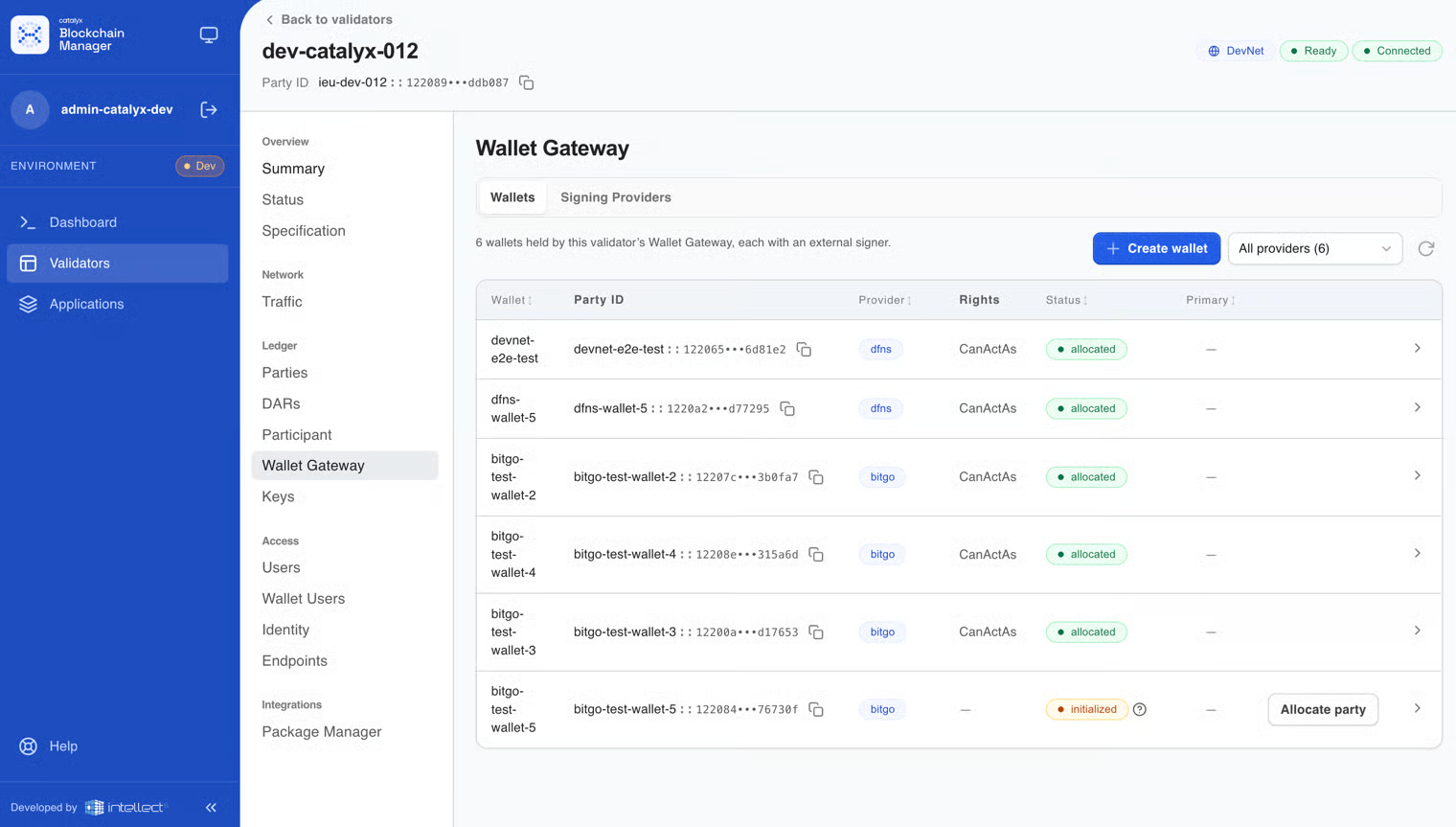
The tab lists every wallet held by that validator's Wallet Gateway, refreshing automatically every 30 seconds (and immediately after creating one). Each row shows:

* the wallet's name and its Canton party ID;
* which provider holds its key (`dfns` or `bitgo`);
* its status — `initialized`, `allocated`, `removed`, or `disabled`;
* whether it's marked primary.

Expanding a row shows more detail: namespace, network, and public key. When more than one provider is configured, the list can be filtered by provider.

**Allocate party.** A custodian can answer a signing request with `pending`, which leaves the wallet `initialized`. Once the provider has signed, use the **Allocate party** action to check with the provider again and allocate the party.

{% hint style="info" %}
Wallets the validator signs for itself — i.e. not custodied externally — are **not** shown here. Those already appear on the [Parties](/catalyx-blockchain-manager/canton-network/version-2.0/user-guide-canton/validators/parties.md) tab.
{% endhint %}

### Creating a wallet

<div data-with-frame="true"><figure><img src="https://2680825251-files.gitbook.io/~/files/v0/b/gitbook-x-prod.appspot.com/o/spaces%2FsUGPGTcyMu8FXsdY8XQY%2Fuploads%2Fgit-blob-6939a8a2e3eeeb6498dd2e49c5d10ce5da391a9c%2Fimage%20(13).png?alt=media" alt=""><figcaption></figcaption></figure></div>

Fill in a short, human-readable name for the party (for example `treasury` or `my-bank`) and pick a signing provider. CatalyX then asks Wallet Gateway to allocate a new Canton party and have the chosen provider generate and hold its key; the wallet appears in the list once allocation completes.

{% hint style="info" %}
**The form has no primary-wallet control.** CatalyX calls Wallet Gateway with one shared service identity rather than a per-user login, so a primary flag set from the UI would apply to everyone using the UI for this validator. The `primary` flag remains available on the [API](/catalyx-blockchain-manager/canton-network/version-2.0/support-and-resources/api-reference.md#wallet-gateway).
{% endhint %}

If Wallet Gateway isn't enabled for the validator, or no signing provider is configured yet, the screen explains what's missing rather than failing silently.

***

## Managing signing providers

<div data-with-frame="true"><figure><img src="https://2680825251-files.gitbook.io/~/files/v0/b/gitbook-x-prod.appspot.com/o/spaces%2FsUGPGTcyMu8FXsdY8XQY%2Fuploads%2Fgit-blob-ebc031879df860bef27e153ac8e7561b8f4d21e8%2Fimage%20(14).png?alt=media" alt=""><figcaption></figcaption></figure></div>

Once a validator has Wallet Gateway enabled, its Signing Provider connection details — the enabled flag, configuration, and credentials — can be viewed and updated live, from the **Signing Providers** sub-tab of the validator's Wallet Gateway tab or through the API, without editing the `Validator` resource or restarting anything.

<table><thead><tr><th width="90">Method</th><th width="420">Path</th><th>Purpose</th></tr></thead><tbody><tr><td>GET</td><td><code>/api/v1/validators/{name}/wallet-gateway/providers/dfns</code></td><td>Reads the current settings. Never returns credentials.</td></tr><tr><td>PUT</td><td><code>/api/v1/validators/{name}/wallet-gateway/providers/dfns</code></td><td>Updates the settings. Each field is optional per call, so rotating just a credential doesn't require resending the rest.</td></tr><tr><td>GET</td><td><code>/api/v1/validators/{name}/wallet-gateway/providers/bitgo</code></td><td>Reads the current BitGo settings. Never returns the access token.</td></tr><tr><td>PUT</td><td><code>/api/v1/validators/{name}/wallet-gateway/providers/bitgo</code></td><td>Updates the BitGo settings. The access token is optional per call.</td></tr><tr><td>GET</td><td><code>/api/v1/validators/{name}/wallet-gateway/providers</code></td><td>Lists the signing providers and whether each is enabled.</td></tr></tbody></table>

The **Signing Providers** sub-tab shows a card for each provider, DFNS and BitGo, each with its own configuration dialog.

{% hint style="info" %}
**The `Validator` resource's `dfns` and `bitgo` fields are fallback defaults only.** Once you call the settings API, the live enabled flag and connection details live in a ConfigMap instead and take precedence over the CR, field by field. Credentials are never put in that ConfigMap — they always go straight to the Secret named by `credentialsSecretRef`. This is what lets the UI's Create Wallet screen know whether a provider is actually usable before offering it.
{% endhint %}


---

# Agent Instructions
This documentation is published with GitBook. GitBook is the documentation platform designed so that both humans and AI agents can read, navigate, and reason over technical content effectively. Learn more at gitbook.com.

## Querying This Documentation
If you need additional information that is not directly available in this page, you can query the documentation by asking a question.

Perform an HTTP GET request on the following URL with the `ask` and `goal` query parameters:

```
GET https://docs.catalyx.solutions/catalyx-blockchain-manager/canton-network/version-2.0/user-guide-canton/validators/wallet-gateway.md?ask=<question>&goal=<user_goal>
```

`ask` is the immediate question: it should be specific, self-contained, and written in natural language.
`goal` is what the user is ultimately trying to achieve, the reason they need the answer. Sharing it helps GitBook give you a better, more relevant answer. A goal is most helpful when it describes the outcome the user wants rather than restating the question. For example, with `ask=how do I create an API token`, a goal like `automate deployments from our CI pipeline` lets GitBook tailor the answer to that use case.

The response will contain a direct answer to the question and relevant excerpts and sources from the documentation.

Use this mechanism when the answer is not explicitly present in the current page, you need clarification or additional context, or you want to retrieve related documentation sections.